Spotify is rolling out a major update for its Wear OS app. If you use a Wear OS-based Galaxy Watch, you can download the latest version from the Google Play Store. The update introduces a redesigned interface that focuses on album art and improves the overall user experience.
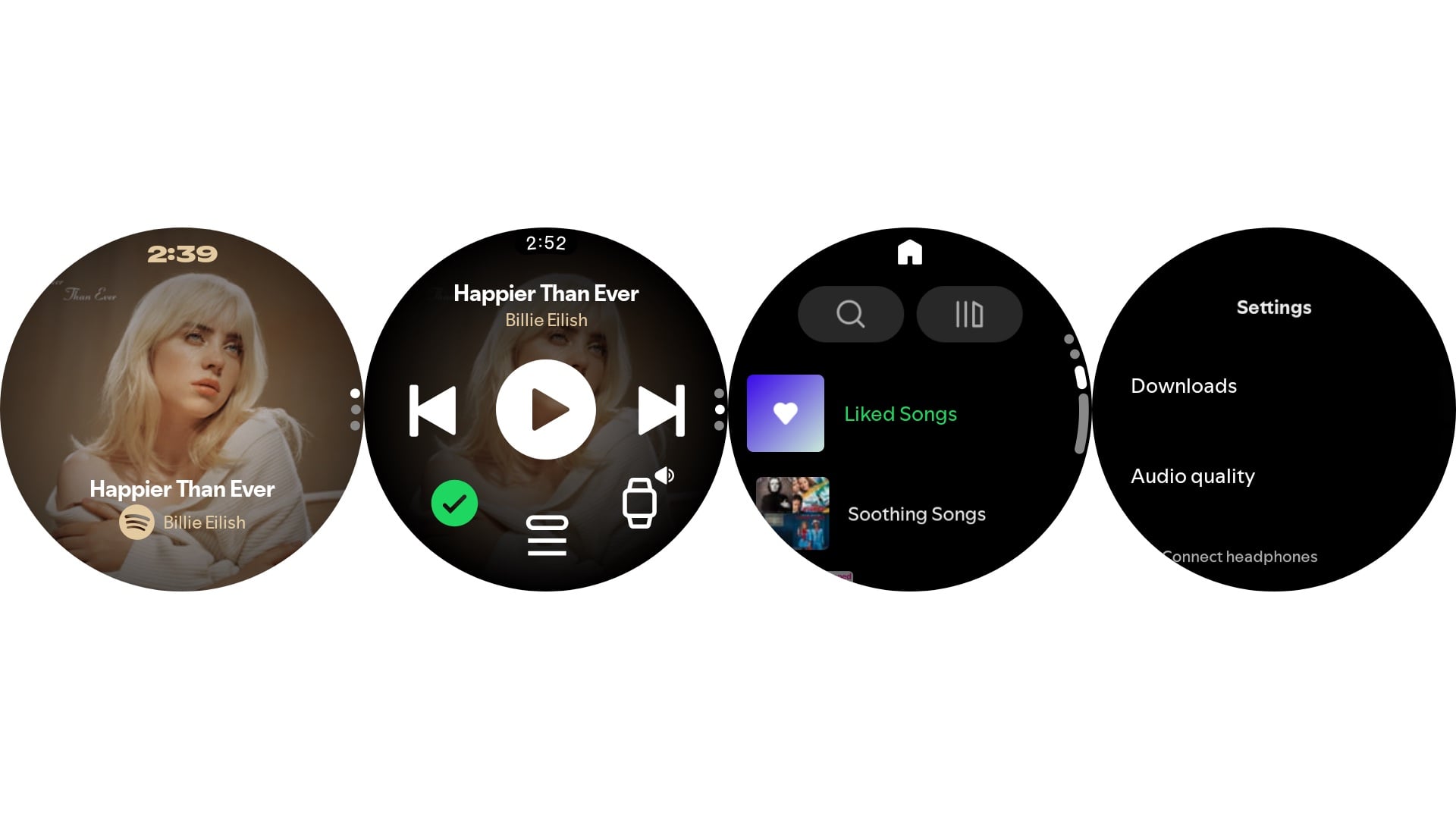
The app now features a new Now Playing screen that prominently displays album art without visible playback controls. However, you can still control playback. A single tap plays or pauses the music, while a double tap on the left side takes you to the previous track and a double tap on the right side skips to the next track.
You can swipe up to reveal conventional controls such as play or pause, previous track, next track, download, queue, and audio output device.
Spotify's new UI on Galaxy Watches – Source: Asif Iqbal / SamMobile
Swiping up again takes you to the Home view, which includes shortcuts for search, your music library, and recently accessed playlists. Scrolling down to the bottom of this screen reveals the Settings section, where you can manage downloads, adjust audio quality (up to very high or 320kbps), and connect wireless earbuds or headphones.
The Your Library page displays your downloads, playlists, podcasts, artists, and liked albums. In daily use, the app feels noticeably smoother than before, especially when navigating between screens.





 Loading ...


