
Related News




Samsung Galaxy XR review
Posted by - support -
on - 6 hours ago -
Filed in - Technology -
-
12 Views - 0 Comments - 0 Likes - 0 Reviews
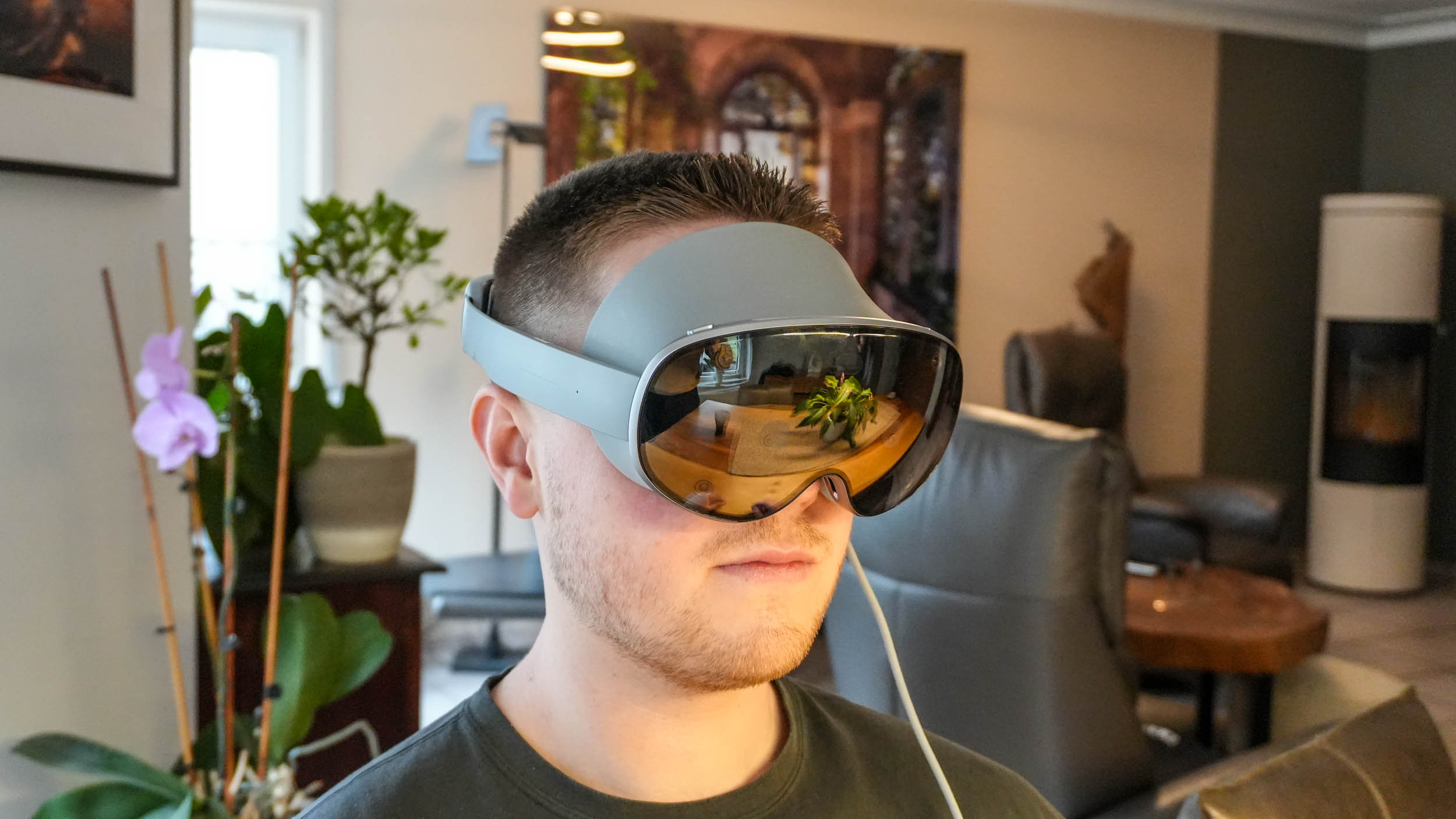
The Galaxy XR is one of those products that instantly feels like it belongs to the future, and at the same time it reminds you that the future is not evenly distributed yet. Samsung’s first-gen mixed reality headset is genuinely impressive in the areas that matter most, especially display quality and overall software usefulness.
As a platform experience, Galaxy XR feels more practical than Apple’s Vision Pro in a lot of everyday scenarios, simply because it can run apps properly and does not feel like it is missing half the services people actually use.
But that’s also a catch. Even if the foundation is strong, the real use case for most regular consumers is still too small right now. If you are not already the kind of person who wants giant virtual screens, spatial multitasking, and a headset-first workflow, you will struggle to justify the price.
In my opinion, Galaxy XR is a super interesting first-gen product that gives you a clear view of what to expect in the coming years. Today though, it still feels more valuable for B2B and pro workflows than it does for most people at home.
Samsung rolled out the Galaxy XR in a controlled way rather than going fully global from day one. That fits the product category. First-gen hardware like this is not only expensive to build, it is also the kind of thing you want to launch carefully because the early months are where software updates and platform direction matter the most.
Pricing puts it in a very specific spot. At $1,799, it is not meant to compete with something like a mainstream VR headset. Galaxy XR sits in the premium tier, but it is still positioned as the “more realistic” alternative to the Vision Pro’s pricing.
Design and build

Samsung clearly had priorities than Apple, and I think they picked the right ones for a headset you are actually supposed to wear. Galaxy XR does not try to win a luxury materials contest. Instead, it focuses on comfort, balance, and long-session ergonomics, which is exactly what a product like this needs.
The way the headset sits on your head is the main story here. Rather than putting pressure onto your cheeks or relying on a front-heavy “face clamp”, the Galaxy XR spreads weight more evenly. In practice, that makes longer sessions more realistic. This matters a lot because the moment you start using XR seriously, you stop thinking in ten-minute demos. You think in “I’m wearing this for a full movie” or “I’m working in here for an hour.”


One downside, however, is the placement of the adjustment mechanism on the back. Wearing the Galaxy XR is comfortable when standing or sitting upright, but the moment you try to lean back or rest your head on something, the rear adjustment ring becomes an issue.
The adjustment ring applies noticeable, pinpoint pressure against the back of the head, which quickly turns uncomfortable. A different placement, such as on the side of the headset, would have been a much better solution in my opinion.

The external battery pack is still a compromise, and it is the kind of compromise you will notice every single time you put the headset on. There is a cable. There is a battery you need to place somewhere. There is one more thing to charge. It adds friction.

At the same time, it also makes sense. Keeping battery weight off the front helps comfort and reduces neck strain. This is very much first-gen architecture, and until battery tech makes a big jump, this is the trade-off for high-end displays and decent performance.
Display quality

Display quality is where Galaxy XR earns its premium status. The microOLED panels deliver the kind of sharpness that makes virtual screens actually usable, not just impressive.
Text clarity is strong enough that you stop thinking about pixel structure, and that is the point. If you want XR to be more than gaming, you need it to handle reading, writing, browsing, and working without your eyes constantly fighting the display.
The optics also play a huge role. With pancake lenses, the experience is not only sharper but also more consistent across the viewing area. That matters for multitasking because you want to glance around with your eyes, not move your whole head just to keep things readable. It is a subtle difference, but it changes how natural the interface feels when you have multiple windows around you.
Mixed reality passthrough is solid and convincing in good lighting, which is where most people will use it anyway. You can stay aware of your surroundings, place digital elements in your real room, and still feel grounded.
In low light, it still looks like camera passthrough, because that is what it is. Noise comes in, motion blur becomes more noticeable, and the illusion breaks more easily. That is not a Galaxy XR problem as much as it is the current state of the entire product category.
Software
This is the section that makes Galaxy XR stand out, and it is also the section that most clearly explains why I think it can be more useful than the Vision Pro today.
Galaxy XR’s biggest advantage is simple: it sits on Android XR, which means it can run Android apps as part of the core experience. That changes everything for a first-gen platform.

Instead of feeling like you are waiting for a new app ecosystem to be built from scratch, you immediately have access to the kinds of apps people already use daily. That includes streaming, productivity, communication, and the random everyday stuff that usually exposes the weak points of new platforms.
To me, that is the key difference versus Apple’s approach. Vision Pro can be impressive, but it still runs into real-world friction around app availability and how services show up on the platform. Galaxy XR feels more like a device you can actually live with because the baseline app situation is stronger from day one.
Input on Galaxy XR is different to anything you have used before but also very intuitive. Eye tracking is honestly one of the most impressive parts of the Galaxy XR. It sounds like a small thing on paper, but in actual use it completely changes how fast the headset feels.


You look at what you want to interact with, and it is basically instantly selected. No cursor hunting, no awkward floating pointer you have to drag across the world. Your eyes do the targeting, and that makes the whole interface feel way more direct than I expected.
Selecting things is simple too. You just pinch your thumb and index finger together and that is it. It is surprisingly easy, but I’m not going to pretend it is perfect on day one. This is one of those systems you need to learn with your hands, not by reading about it.
The setup process does a good job showing you the basics, and it gives you a quick introduction to the gestures, but actually using it in real apps is what makes it click. After a bit, the gestures start feeling natural, and you stop thinking about them.

Mixed reality passthrough lets you see your surroundings clearly
The best part is how consistent the gesture logic is once you get used to it. You look at an icon, pinch to select, and you are in. If you want to bring up the home menu, you rotate your hand slightly and pinch again. It sounds weird written down, but in practice it feels like a quick little “wrist turn, pinch” shortcut you can do without breaking your flow.
And for stuff like Maps, pinching with both hands and doing a zoom gesture feels exactly like what you would expect. You can zoom in and out the same way you would on a phone, just in the air, and it is one of those moments where you realize why XR can feel more intuitive than classic controls when it is done right.
All of that said, the software advantage does not magically create a killer consumer use case. Many Android apps were designed for phones and tablets, and while they can run in XR, not all of them feel like they belong there.
Some apps feel great as floating windows. Others feel like you are forcing a familiar UI into a new environment. That is fine for practicality, but it does not automatically create the “I need to wear this every day” moment for most people.
And this is where my overall take becomes very clear. Galaxy XR’s software foundation is better than most first-gen platforms because it is not starting from zero. But the ecosystem still needs time to grow into experiences that feel truly spatial rather than just “apps in the air.”
Galaxy XR works best when it behaves like an extension of your existing setup rather than a standalone island. If you already use Galaxy devices, the continuity angle makes the headset more practical because you are not constantly switching worlds. It feels like one system, not a separate experiment.
Media is a huge part of the experience too, and this is where the Android app advantage becomes very obvious. You are not stuck with awkward workarounds for mainstream services. You can treat the headset like a personal cinema, but also like a flexible media and multitasking hub that does not fight you for choosing normal apps.
The other big angle is using the headset as a serious screen replacement for specific scenarios. Virtual monitors, multi-window setups, and the general ability to create your own space is where Galaxy XR starts to feel like more than entertainment. This is also where B2B makes the most sense, because workflows and productivity are easier to justify than lifestyle.
Google Gemini

Gemini integration is one of the coolest parts of the Galaxy XR experience, but it is not magic yet. Right now it feels like a tool you actively use rather than an assistant that is just there in the background helping you without you noticing. And that is not even meant as a negative. It is just the current reality of AI on devices like this.
When you trigger Gemini, it is genuinely useful. Looking things up while you are already inside the headset, getting quick context on something you are seeing, or even doing small productivity moves like reorganizing your app layout works well. It fits the idea of spatial computing because you are not breaking your flow by grabbing your phone or opening a laptop.
You just ask for what you need and stay in the experience. But you still have to focus on it. You still have to stop for a second, decide you want help, and then trigger it. It does not feel like a natural “sidekick” yet, more like a powerful feature that you pull up when you want it.
That is also why I think this is one of the most promising parts for the future. If AI keeps evolving at this pace, I want Gemini to become more intuitive over time. Not in a creepy way, but in a helpful way. Something that understands what I am doing and knows when I might need assistance, instead of me having to constantly ask it to do something. Basically an assistant that feels present, not a button I press.


Another feature I really like is Circle to Search. If you have used it on a Galaxy phone, you already know the idea, and it translates really well into XR. You can simply look at something, pinch the home button, circle it with your hands, and instantly get a web-based analysis or details about what you are seeing.
And that is exactly the kind of feature that makes XR feel practical. It is fast, it is simple, and it turns the headset into something that can give you context on the world around you in seconds.
Conclusion
The Galaxy XR is exactly what I want a first-gen product to be. It is not perfect, it is not for everyone, but it is a genuinely convincing first step into Android’s spatial future. Samsung nailed the fundamentals that matter most for a headset like this. Comfort is good enough that you actually want to keep it on, the micro-OLED displays are sharp enough to make virtual screens feel like real screens, and the software foundation is simply stronger than what most new platforms can offer.
And for me, the software part is the biggest reason why Galaxy XR feels more practical than the Vision Pro today. Android XR does not feel like a closed experiment that is waiting for developers to catch up. You already have apps, you already have services, and you can actually use the headset for more than just curated demos.
The navigation system is also a huge win once you get used to it. Eye tracking plus pinch gestures make everything feel fast and direct, and it is one of those things that is hard to appreciate until you actually live with it for a bit. The same goes for Circle to Search, which is one of the most instantly useful XR features I have tried so far because it makes getting context on the fly ridiculously easy.
But even with all of that, the reality remains unchanged. The use case for regular consumers is still too small right now, especially at this price. If you already love the idea of working in virtual monitors, building multi-window setups, or watching media on a giant screen anywhere, you will get it immediately.
If you do not already have a reason to wear a headset, Galaxy XR is not going to magically create that reason, at least not yet. A lot of apps still feel like normal Android apps floating in space, which is useful but not the killer moment that makes XR mainstream.
That is why I keep coming back to the same conclusion. Galaxy XR feels like a bigger win for B2B and pro workflows than it does for most people at home. Training, visualization, remote collaboration, productivity setups, that's where it makes sense today and where the value is easy to explain.
For consumers, it is more of a glimpse into what is coming. And that glimpse is honestly exciting because the foundation is there. Now the ecosystem has to catch up, and Gemini has to evolve from something you actively trigger into something that feels more present and intuitive.
When that happens, I think products like this will stop being niche. Right now, Galaxy XR is not the end goal. However, it is the beginning, and a strong one.
The post Samsung Galaxy XR review appeared first on SamMobile.


 Loading ...

