Samsung has been working on a major UI redesign for its SmartThings app over the past few months, and we exclusively gave you a first look at that new interface a couple of months ago. Now, the company has released the redesigned version of the app, arriving on iPhones before its own Galaxy (or other Android) devices.
A new update (version 1.7.51) for the SmartThings iOS app went live earlier today, introducing Apple's Liquid Glass design language alongside an overall lighter color scheme, which makes the app look more lively. While the app retains five main tabs, it now features a compact, floating navigation bar with a Liquid Glass look.
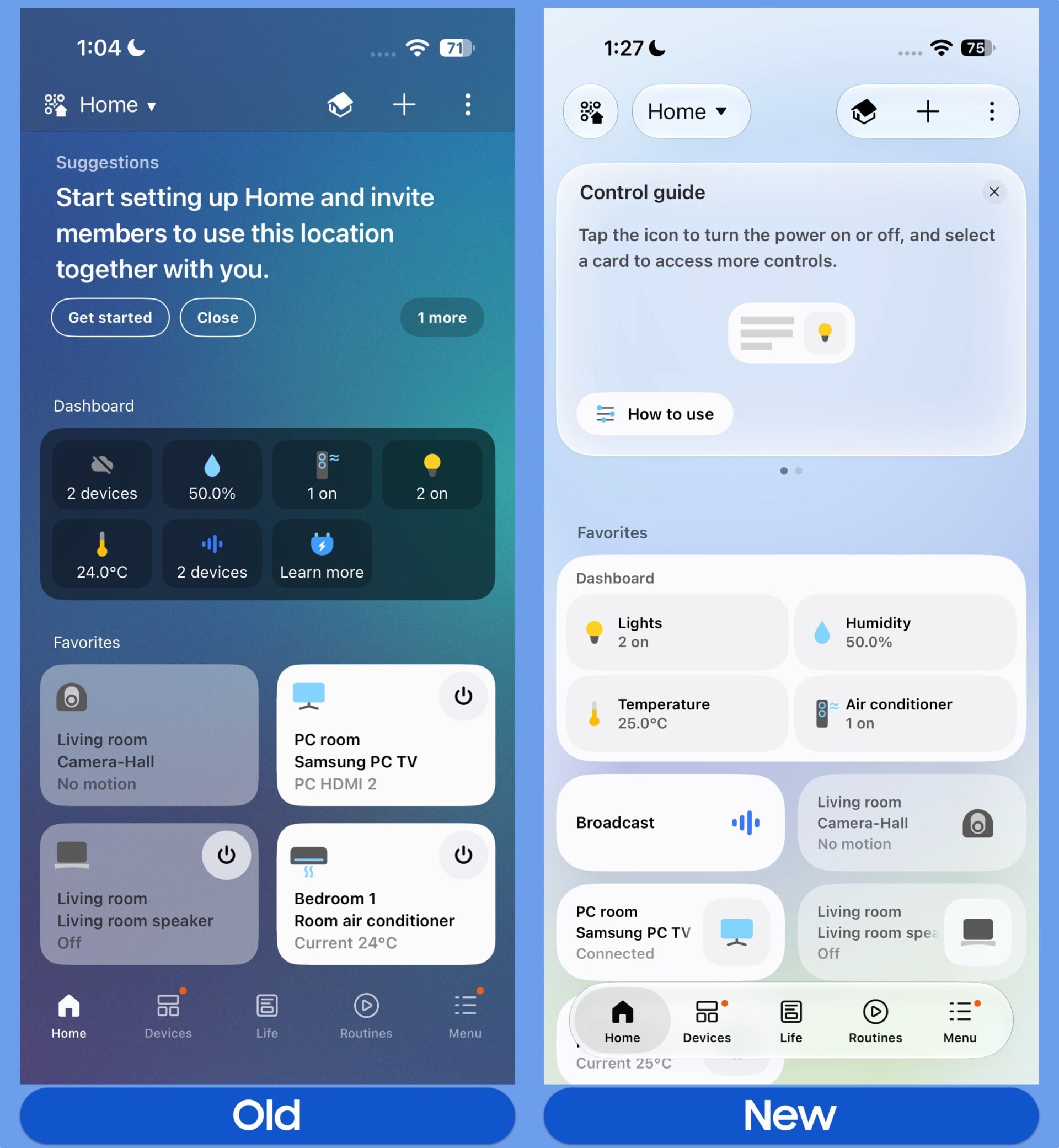
You can see a comparison between the old and new designs in the screenshots below.
Home tab in old and new versions of the SmartThings app for iOS | Source: Abhijeet Mishra / SamMobile
Devices tab in old and new versions of the SmartThings app for iOS | Source: Abhijeet Mishra / SamMobile
By default, the new app uses more compact cards for each device or routine, but you can still resize them if you prefer larger cards. Tapping a deviceâs icon turns it on or off (or triggers its assigned action), while tapping anywhere else on the card opens its full controls.
Introduction of new SmartThings app for iOS (September 2026) | Source: Asif Iqbal Shaik / SamMobile
Home, Devices, and Life tabs in SmartThings' iOS app | Source: Asif Iqbal Shaik / SamMobile
Routines, Menu, and Settings sections of SmartThings' iOS app | Source: Asif Iqbal Shaik / SamMobile
Routines sorting and Linked Services section of SmartThings' iOS app | Source: Asif Iqbal Shaik / SamMobile
At the top of the Home tab, a dynamic summary card highlights key insights, such as weekly or monthly energy usage, quick remote access for TVs, family care alerts, and suggested automations. You can dismiss this card if you prefer to see your connected devices right away.
The Favorites section, which shows pinned devices and routines, is also featured in the Home tab. At the top of the screen, your homeâs QR code, the location drop-down selector, and the overflow menu are now enclosed in individual pill-shaped outlines rather than being borderless.
The built-in virtual remote for TVs and smart monitors now supports a dedicated Light Mode. It can be resized for easier one-handed reach and moved to any of the four corners of the screen. The dedicated TV hub page also adopts the floating tab bar layout, divided into three sections: For You, Featured, and Settings, with a persistent Remote shortcut on the bottom right corner.
Deeper sub-menus, such as specific device plugins for air conditioners, soundbars, wireless speakers, and washers/dryers, have not yet received the redesign. Samsung will likely roll out updated designs for those individual device plugins with future updates.





 Loading ...

